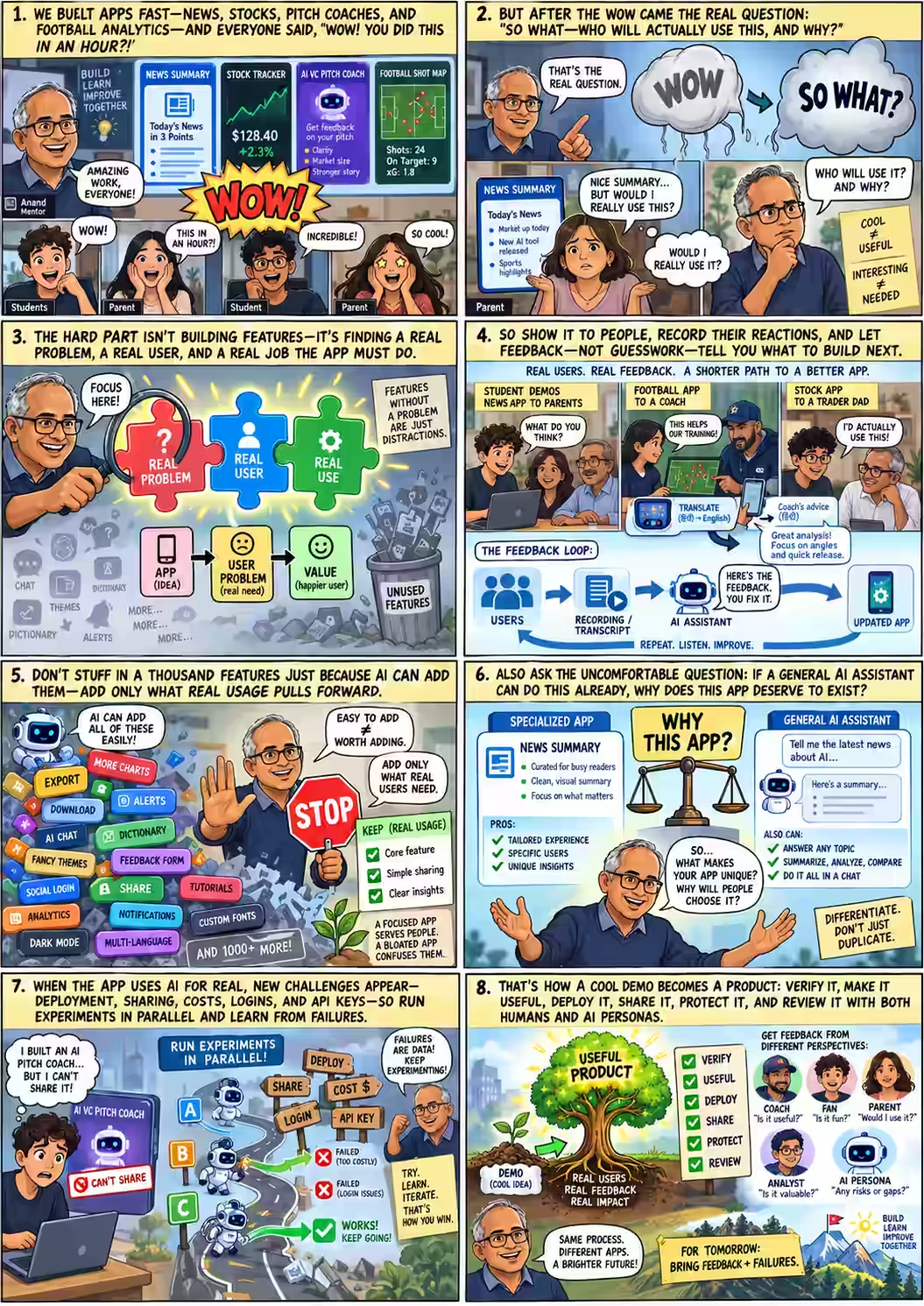
"Wow, you did this in an hour?" · "Uh, okay."
Day 1 had ended with one piece of homework: show what you built to someone outside the room, and come back with what they said. Tuesday's session — an optional, remote, hour-long query clinic — opened with Anand asking who had, and what they'd seen.
KK went first. His app from Day 1 summarised the news. He hadn't managed the two students the assignment asked for, so he showed it to his parents instead.
Anand's own reaction, watching the same handoff play out, was identical — right down to the shrug at the end of it:
"Wow, okay, this is great. I can get a summary of the news very quickly. Then... so what? Or what do I do with it? Would I really use it?"
— Anand, reacting to KK's news app the way KK's parents had
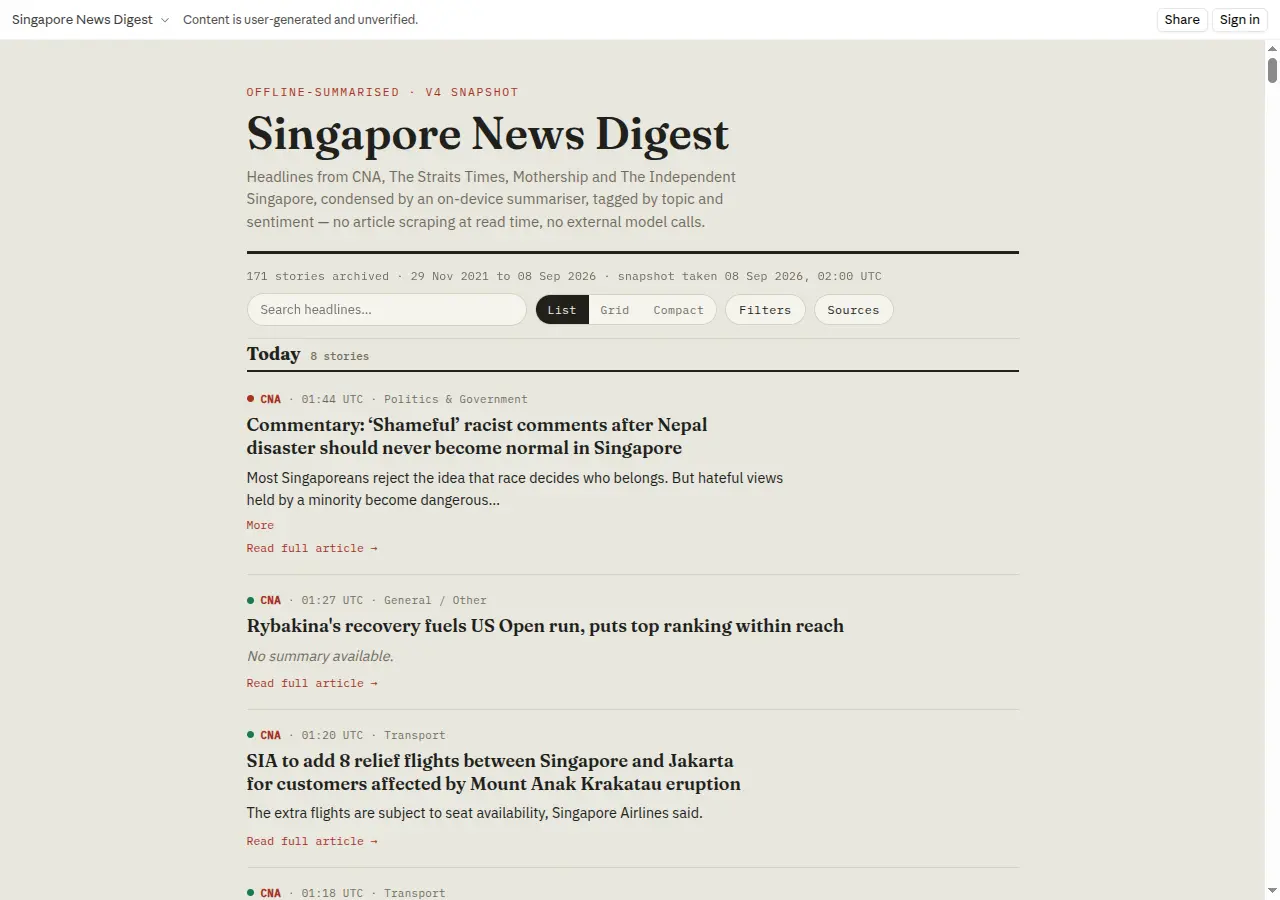 Open live app ↗
It's a useful moment precisely because nothing went wrong. The app worked. The demo landed. The wow arrived on schedule, right where the comic panel puts it — and then evaporated, because impressiveness and usefulness turned out to be two different things measured on two different axes. Once you get over "oh, this is really impressive," what do you do next? That became the question the rest of the hour circled.
KK's own answer, when pressed, was to reach for the oldest reflex in the room:
The joke lands, but underneath it is the actual lesson: you can't monetise your way out of not knowing whether something is useful. Anand's redirect was gentler than the punchline — pricing is a real thing worth exploring later, but it doesn't answer the question in front of you. The question in front of you is a harder, more upstream one:
"Finding problems is hard. Being able to verbalize problems is hard. Once you know what the problem is, AI can help you solve them."
— Anand
That's the whole thesis of the week compressed into two sentences, and it's also panel three of the comic: a magnifying glass over a question mark labelled real problem, sitting next to two other puzzle pieces — real user, real use — with a pile of unused, problem-less features dumped in a bin beside them. Building has stopped being the bottleneck. Knowing what's worth building hasn't.
Record the feedback, hand it to the AI
Johan went next, sharing his screen — apologising in advance that the app was in Indonesian. It was a stock-tracking tool, also built for his parents: real-time prices pulled from Yahoo Finance, a CSV export of trading history, a position tracker that calculated margins automatically, a break-even calculator, even a "Saving Plan" feature that walked a user through how much to set aside so they wouldn't trade impulsively.
One feature surprised its own creator:
"This is a dictionary — which is funny because I told it that I was a beginner in stock trading, and then it added this in, which I didn't give it any specific instructions. So this was a surprise to me."
— Johan, on a glossary his AI coding agent added unprompted
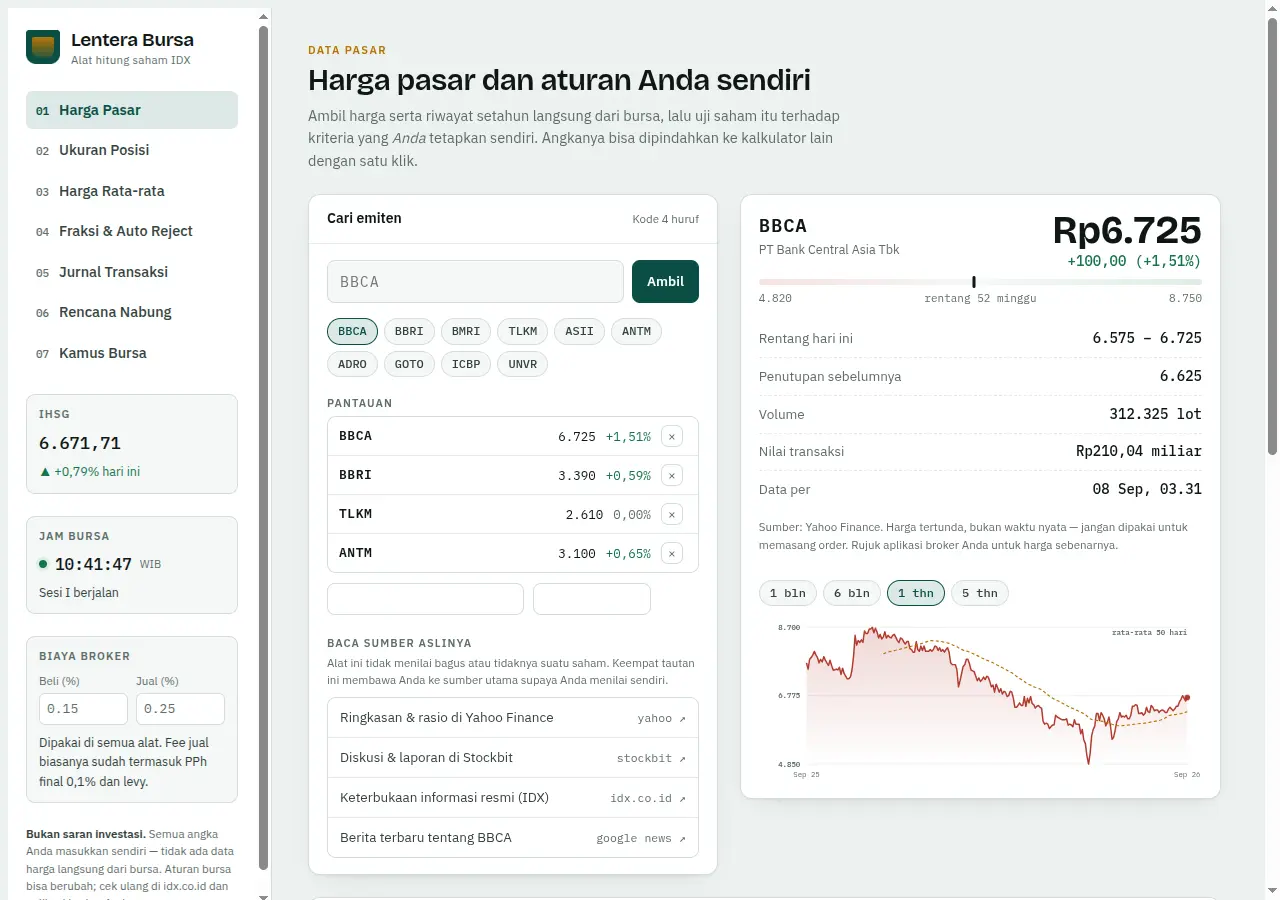 Open live app ↗
His parents' actual feedback was more mixed: some essential features — reading charts, getting predictions — were missing or watered down, because the model he'd built it with declined to give financial predictions, calling itself an unlicensed advisor. Other features nobody needed were still sitting there, cluttering the interface. Confusing at times, Johan called it — too much of what wasn't needed, not enough of what was.
That gap — between what got built and what got used — is where Anand spent the rest of the segment. His answer had two parts, and both of them route around the instinct to sit and think harder about the product yourself.
Anand pushed the first idea further than a tip for founders — he described it as the default posture for anyone starting a job today:
"One of the things that I tell the interns who join Straive is: get into meetings, record the meeting, don't even try and think about it because you won't understand half of what's being said. Just take the recording and pass it to Claude or ChatGPT and tell it to build the app. That's it. You will learn in the process, but let's not assume that you know more than these systems in many areas. We may not."
— Anand
Johan asked the natural follow-up: should he add an in-app feedback form, so users could report problems without him being in the room? Anand's answer doubled back to the theme from Scene One — that ease of building is not the same as usefulness:
"It's very easy to add any feature. It's easy to create a version with feedback, without feedback. It's easy to do anything. That being the case, there are a thousand things that you can do. You could literally ask it: 'Think of a thousand features and add it.' But which of those will be useful becomes an important question. […] What should we add comes from feedback from real usage."
— Anand
This is panel five of the comic, almost verbatim: a hand held up in a stop gesture against a swarm of tempting, easy-to-add features — charts, alerts, dark mode, social login, multi-language — with the caption don't stuff in a thousand features just because AI can add them; only add what real use pulls forward. The constraint on a product was never engineering effort. It's judgment about what real use actually asks for — and that judgment, unlike the coding, still has to come from watching someone use the thing.
Why does this app deserve to exist?
Before moving to the next volunteer, Anand paused on a question that cuts underneath the feature-list conversation entirely: given that everyone already has ChatGPT or Claude sitting in a browser tab, why build a dedicated app at all?
"Look, everybody has ChatGPT, everybody has Claude. You can build an application; they can build an application too, just as easily. Why do we even need an application?"
— Anand
He made it concrete with Johan's own domain: what would it take to just ask Claude or ChatGPT, directly, "What should I trade on next?" Tell it to maintain a portfolio ledger on a spreadsheet somewhere, and go fetch whatever market data it thinks is relevant. No app required.
"We are so used to specialized software doing things that we forget there's one general-purpose software now — a few, like Claude and ChatGPT — that can do the work of most software. If I wanted news summarized, I would just go to ChatGPT and say 'Summarize the news for me,' and it gives me the same summary. Why do I need an app for that? Which is not to say that we shouldn't have an app — it is to say that we have a similar capability elsewhere, and we need to think about why this is different and useful."
— Anand
It's the sharpest reframe of the hour, and it folds KK's news app, Johan's tracker, and every app the room would build for the rest of the week into one test. Panel six of the comic draws it as a side-by-side: a specialised app's pros — curated, clean visual, focused on one niche — set against a general AI assistant that can already summarise, analyse, compare and chat about anything. The caption underneath doesn't split the difference: differentiate, don't just duplicate.
A coach's-eye view, in two languages
The last volunteer was a student Anand didn't have a name for yet — the meeting only showed a student ID. He shared his screen anyway: a map of shot positions across the English Premier League's 2025–26 season, every team, every player, plotted against how often a shot from that spot became a goal.
He introduced it in Japanese, and the room's own interpreter — Takayuki Shuku, the visiting Tokyo City University professor accompanying the exchange students — supplied the translation:
"I created this site. It shows the relationship between shot positions and the probability of goals in the English Premier League — the 2025–26 season, all 20 teams, every player."
Anand's reaction was immediate and specific: a coach would find this genuinely useful. But rather than translate his own next sentence and wait, he tried something the room hadn't seen yet — he opened ChatGPT's voice mode and asked it to interpret for him in real time.
"I don't personally know a real coach I could introduce. But if I tried it for real, soccer or basketball coaches, school club coaches, personal trainers, or sports analysts would be good candidates."
It's easy to read past how strange this moment actually was: a live class, an audio interpreter with no script, translating one professor's advice about product feedback into another language in real time, mid-lecture — because it was faster than waiting for a human to do it. The tool the class was there to learn about had just quietly become the thing running the class.
Takayuki stepped in to sharpen what Kosei had actually built and for whom:
Anand's closing suggestion tied the moment back to the day's central move — from artefact to product is a change of vantage point, not a change of code:
"Just mentally wearing the hat of a coach: 'How would we use it?' and make actual suggestions. Maybe add a few people to the team, tell these people to play from here, some people are stronger in certain areas, make passes on that side. In other words, once it starts becoming useful, that's when it turns into a product."
— Anand
Ask an AI to review the AI
As the session was winding down, KK came back with a question that had clearly been building since the "why does this app exist" detour:
"Wait, wait, one — I just thought, because you said AI, right? Can we pass the app to like ChatGPT or something, then get that AI to evaluate it?"
— KK
Anand's answer was an unqualified yes, followed immediately by a technique for making the evaluation actually useful — assigning it a point of view rather than asking for a generic opinion:
"Absolutely! And you could ask it to play the role of different personas as well. You could say: 'Look, for instance, I want you to act as a football coach; review this app. I want you to act as a football enthusiast; review this app.' I would ask it what other persona [it suggests], and it may say, 'Oh, maybe we could be a media company or a sports channel,' and review this like a sports channel. You could almost do a survey, you could have it do a business strategy."
— Anand
He didn't oversell it. Weaker models, he noted, "may not be right, it may not be good" at holding a persona convincingly — "the smarter models may do a better job. I'd say Astra or Fable will probably do the best job if you have enough credits" — but even a persona review that isn't perfect beats no review at all. And it doesn't replace people:
"It may not be perfect. So human feedback is going to be important. But yes, they are pretty good at this sort of review as well."
— Anand
It closes a neat loop with Scene Three's "why does this app exist" question. If a general-purpose AI can already do the work your app does, it can also — wearing a different hat — critique the work your app does. The same capability that threatens to make a dedicated app redundant is also the cheapest QA panel anyone in the room will ever assemble.
What Tuesday left for Wednesday
Anand closed the hour by naming exactly what he wanted to see at the next checkpoint — and, notably, none of it was "ship more features."
- Show the app to a few more people, and this time record it — video if possible — rather than trying to remember the feedback afterwards.
- Report back on where you needed to tell the agent to do something different, or extra, and why.
- Report the failures, specifically — not just what shipped, but what didn't work and had to be abandoned or rebuilt.
- Come prepared for the pivot Wednesday's required checkpoint is built around: "How do we know the app is working? How do we verify it? How do we make it useful? How do we go about deploying it? How do we share it? How do we protect it?"
Questions in the meantime, Anand said, could go to [email protected] — the address he dropped in the chat as the students signed off, one by one, in English and in Japanese.