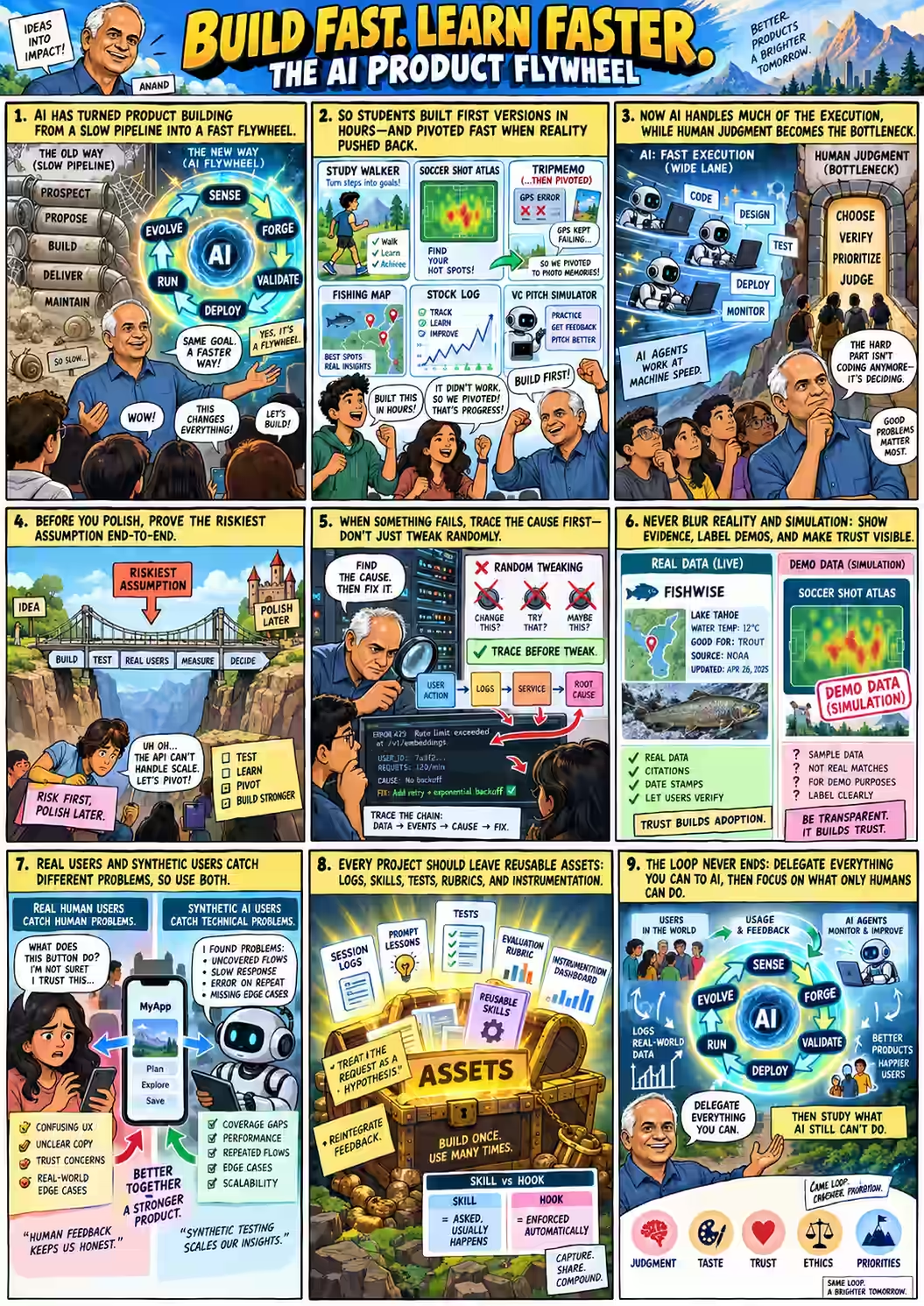
The StraiveX cycle, live
Anand opened not with a plan for the day but with a name for what the week had already been: "What I've been walking you through is roughly the equivalent of the StraiveX methodology that we're using at Straive to build products." Five old stages, he said, have quietly become five new ones — not because the goals changed, but because AI collapsed the time each stage takes.
The cycle doesn't terminate. "Once you have the evolved version, you can use that data to sense whether there is a new product required... and start the iteration all over again. Product development is not something that you end with one cycle; it's something that you keep running." Faster because of AI, and — Anand hedged, mid-sentence — "also something that is, I guess, easier — maybe. It's different, so it's confusing, but it ends up making the current cycle of products much easier."
The StraiveX methodology is the internal name for how Straive — where Anand is Head of Innovation — builds AI products for clients: sense, forge, validate, scale, run & evolve, replacing the old prospect-propose-build-deliver-maintain pipeline. The methodology deck itself is internal; what mattered for the class was the shape of the argument, which Anand had already been teaching for a week without naming it.
"Product development is not something that you end with one cycle; it's something that you keep running."
— Anand
Assets, skills, and hooks
Anand's next move was to name the thing that makes the loop compound rather than just repeat: "One of the things that it delivers as a byproduct — those are assets. We're doing some work, and from that work we learn something that we can reuse the next time, or even other people can reuse the next time." Two candidate assets were sitting in plain sight: everyone's chat logs, and everyone's session transcripts.
"Let's take the session logs that you were sharing where you were giving prompts. That is something that we could collectively learn from each other and find out if there are any best practices for using those session logs."
— Anand
To make the idea concrete, he drew a line between two kinds of reusable asset — one that's requested and usually followed, one that's enforced and always is:
Then he turned it into an exercise, live, using the class's own material as the raw ore — an unplanned demonstration that a whole cohort's chat history is itself a mineable dataset: "What are patterns of prompting that have worked well? What are patterns of prompting that have not worked so well? I'd like you to create maybe the top five most prioritized lessons that could be used as a meta-prompt." The one instruction that mattered most: "Don't put in things that agents would already know or people would already know; put in what is unusual about this."
The same spreadsheet every submission has lived in all week, read live mid-session — about to grow two new columns and a second sheet of its own.
A meta-prompt from everyone's chats
While the analysis ran in the background — with local file and browser-tab access to the class's own material, since some of the chat logs had loaded in Anand's browser rather than downloaded cleanly — he narrated the process as much as the content: "Something's wrong, I'm not able to click... okay, the chat logs are not yet created, they are getting downloaded... let's just do this manually." The result, once it landed, is the whole session's most exportable artifact: a five-rule prompt any of them could paste at the top of any future project.
Read the full exchange: Learnings from Prompts Open the original chat ↗
"Treat my proposed solution as a hypothesis, not a specification. This may be one of the most important prompt suggestions. Very often when we ask for something, we don't ask very well... Think of it as a rough draft of my real need. It's okay, even though I ask for X, it's okay to give me Y, something close, but do a good job."
— Anand, reading the top-ranked lesson aloud
He recognized it instantly as his own most-used habit, formalized: "I have a skill called 'reframe question.' And invariably, in almost all of my prompts, I put in exactly this." That's a real, public skill — reframe-question, which does exactly what Anand describes: treat the literal ask as a rough draft of the real need, and answer the better question underneath it rather than the one literally typed. The other four lessons landed with a mix of recognition and self-correction:
A student asked the obvious follow-up: are these universal, or specific to one model? Anand's answer refused a tidy universal rule while still landing somewhere useful:
"Every prompt suggestion has a lifetime. It's relevant in that particular context... Short answer is: test. I don't know, and there is no universal answer... But short answer, in my experience, prompting tips are generally cross-model. They're more a function of how we prompt than how the model responds — more to protect human mistakes than model mistakes or harness mistakes."
— Anand
He did let the agent test the directional question anyway — and got a real, if tentative, answer: tracing failures end-to-end and proving the riskiest assumption first both showed up more strongly in Claude Code sessions than ChatGPT ones, likely because Claude Code's file, shell and browser access makes an instrument-the-failure workflow unusually effective — though Anand was careful not to over-claim: "I'm not sure if that's because people using Claude tend to prompt this way, or Claude itself tends to make these mistakes. I wouldn't decide just yet."
"They're more a function of how we prompt than how the model responds — more to protect human mistakes than model mistakes or harness mistakes."
— Anand, on whether prompting lessons are model-specific
AI writes its own grading rubric
Then Anand turned the same method on the course itself. "Now, the next thing that I'm going to go into is let's see how well we've done as part of this exercise — effectively the evaluation part of this course. And you will have a say in the evaluation." He fed the same kind of agent everything it would need to propose a rubric it had no reason to know in advance: every day's transcript, every student's submissions, the intake form, and — critically — his own past conversations about what matters in the AI era.
"I've had a lot of conversations with ChatGPT, Claude, etc., and I've saved it on my machine, and I have a point of view on what people should be learning when AI and agents are so powerful... I've told it, 'Go fetch all the information, all the submissions, and identify the evaluation criteria.' I'm not sure. I may have some points of view; it may have some points of view. But the information that's available to it certainly is more than anything that I can probably think of at the spur of the moment."
— Anand
Seven criteria came back, read aloud one by one: picking a good problem; shipping something non-trivial; real-user evidence and evidence-driven iteration; verifiable, trustworthy work; using AI well and learning from failure; accountability and real-world judgment; and communication. "These two are — just evidence and evaluation — are probably the most important criteria." That output became evaluation-prompt-original.md, and the seven-criteria structure survived every later revision.
Read the documents themselves — the rubric as first drafted, as later revised, and the reasoning behind each change (weights unchanged throughout at 15/10/20/20/15/10/10):
First draft: evaluation-prompt-original.md Current: evaluation-prompt.md Revision notes
Every version keeps the same central unit of evidence, stated almost verbatim in the transcript's own closing words: "Here is the product. Here is what it can and cannot do. Here is the evidence. Here is why you should or should not trust it."
None of these, on their own, count as evidence of the thing actually being trustworthy. A well-diagnosed failed experiment can be stronger evidence than an effortless success.
Hack your own evaluation
Rather than simply hand down the rubric, Anand built — live, in the middle of class, narrating the build as it happened — a small app that let every student argue with it. "What I'm going to do is build an application that will take all the feedback and it'll give you a response saying, 'I think I should take this feedback, I won't take this part of the feedback,' etc." The build brief, given to the agent almost verbatim from the front of the room:
"I would like you to build an application that allows students to submit their suggestions for changes to the evaluation prompt that I have uploaded. Allow the students to share their inputs as a text field with as many details as they would like, and save that. Allow each student to edit their own responses and they can also submit multiple feedback items. If possible, share thoughts on how appropriate or useful it would be to incorporate the entire feedback or change to the evaluation process, either in part or in full."
— Anand, building the brief live
Johan caught a gap in the plan before it shipped — deliverables were piling up across email, videos, and now this app, with no single place to find them: "And all of them, besides the transcript of the chat, are sent through the email?" Anand: "Ah, no, good point. Let's just add it to the same sheet. That is actually an excellent idea." He restructured the shared spreadsheet on the spot, live, exactly the kind of "catch it and fix the process immediately" habit the course had been modeling all week.
While the app built, Anand tried a small self-test through its companion chat, live in front of the class — feeding it a vague complaint on purpose to see what it did with weak evidence: "Isn't this too complicated for a student to understand? Can we have a simpler evaluation mechanism or rubric?" The response pushed back rather than caving:
"'Concern may matter, but the exact scoring or rubric change is not clear.' So it's telling me, 'Look, Anand, it's fine if you want to change it this way, but what exactly are you proposing?' That's not clear. And okay, I am not giving it any evidence to say that the prompt is not a good one... which is a reasonable feedback. If I had thought it through, I would have asked it to make that change."
— Anand, reacting to his own app's pushback
Then the invitation, deliberately mischievous: "Try and give yourselves an evaluation that will give you as many marks as possible. Feel free, hack it." The class broke for a ten-minute stretch while the tool — SUTD Evaluation Prompt Lab — took live student input on how the very rubric grading them should change.
Read what students actually proposed, and the reasoning for what changed: Raw feedback (CSV) Full revision notes
This page does not include, and deliberately withholds, any actual scores, rankings, or per-student evaluation output the rubric produced — only how the rubric itself was built and revised.
Synthetic users vs. real users
Almost as an aside, Anand noticed the class had accidentally collected something rare: paired data. Every student had run AI-persona research on their own app and later collected real human feedback on the same app. "All of you used agents to check your product. You also used humans to check your product. What's the difference between these? That's a pretty powerful and interesting learning."
He asked the agent to compare the two directly, with a strict instruction not to manufacture a finding that wasn't there: "Be specific and give me examples of these differences... and also try and generalize it so that this can be a reusable lesson." Read the full comparison, coded case by case across six products: Other Assets — the full chat
"Synthetic users tell you where to look. Humans tell you what matters." About 55% of what AI personas flagged was later echoed by real testers — strong for a natural experiment this small, but not proof of accuracy. Synthetic agents were unusually good at domain constraints and workflow friction (Yuri's Study Walker research predicted almost exactly what human testers hit); they were much weaker at predicting salience — whether a flaw would actually dominate someone's experience, versus just being technically findable.
Reframed as a general rule for any AI-assisted validation, not just app testing: AI can estimate possibility much better than importance. Or, sharper still: "Don't make the AI pretend to be a user. Make it behave like a test agent." — give it a goal and the real artifact, and ask it to find failure modes and falsifiable predictions, not invent quotes about how a persona would "feel."
The comic drawn for the day puts the same split in one frame: real human users catch human problems — confusing UX, unclear copy, trust — while synthetic AI users catch technical problems — uncovered flows, slow responses, missed edge cases. Neither replaces the other; the panel's own line is "better together, a stronger product."
What the whole class learned
In parallel, Anand pointed the same method at everyone's learnings videos — nine of them, transcribed and read by an agent, sorted by how often a lesson repeated and how much it mattered. "I'd like you to go through this and identify the top learnings that have high impact and high frequency." Read the full ranked analysis: Student Learnings — the full chat
- AI can do much of the execution; human judgment is the bottleneck. "About seven to eight people out of the nine who have shared feedback have mentioned this... without doubt, this should be the most important lesson."
- AI dramatically lowers the barrier to build software. "The change is not 'Can I implement this?' but 'Can I tell it what to do? Can I see the output, verify the output, and can I improve it?'"
- Clear purpose and specific instructions beat vague prompting — with a deliberate counter-lesson attached. "You've seen me prompt very vaguely... please also consider the opposite lesson: that the loops, those repeated corrections, that effort may also be teaching you something worth learning. Don't force specificity; that can also take you down a wrong direction."
- Real-world constraints should change the product, not just be worked around. "API costs, model limits, deployment restrictions, unreliable GPS, security, deadlines... unless you know what's possible and what's not up front, it's going to make it harder." Directly connects to lesson #2 from Scene Three: prove the riskiest assumption first.
- Real users expose problems that AI and the builder don't see. "Confusing UI, unclear buttons, an emotional reaction — these are exactly the kinds of things humans catch and AI does not, because it doesn't get confused. It understands this sort of thing pretty well."
Anand named the exercise for what it was — a post-mortem, done twice over, with the second layer being new: "We have two dimensions of post-mortems that are coming out. One: the agents are able to do the post-mortems and tell us what to do. Two: the agents are also able to tell us what kinds of post-mortems to do... The specification — telling it, 'Look, I do want a post-mortem, I do want reusable assets' — that's the skill that you retain, and that's exactly what you have collectively learned as a lesson."
One line from the synthesis Anand read out loud as the closest thing to a course thesis: "AI made building cheap. That made purpose, judgment, communication, testing, user observation and willingness to change direction more important."
Seven students present
After the break, the room became a stage. "What we're going to be doing towards the end is having you come over and present your applications." Seven students, five minutes or less each, in whichever language they preferred — several switched into Japanese mid-demo and let a translation tool carry the rest. Anand's brief to the audience mattered as much as the demos themselves: "As we listen, get a sense of the functionality of the application, but also the process that went into building the application."
Study Walker helps someone who has a goal but doesn't know how to begin take one small, specific action today. Yuri, presenting almost entirely in English despite calling it a struggle, walked through the flow live: enter a goal ("I want to get started… making a game"), pick a starting point, pick how much time is available, pick what's on hand — and the app returns exactly one concrete next action, with the exact search terms a complete beginner would need, because, as she put it, "if you are a beginner, you do not know what the way I start this action."
"Functionally, it's not a very complicated application. But the execution is something that is now compressed dramatically. Yuri's able to do this in one day... This was actually useful for me because I, when I tried it, learned a little bit of Rust — something I've been wanting to do but postponed for almost two years."
— Anand
Study Walker was also the app whose overnight synthetic-user research most closely predicted what real testers later hit — see Scene Six.
Shot Atlas maps the relationship between where a shot is taken and how likely it is to score — filterable by open play, set pieces, and penalties, and splittable by first half versus second half. この黒いバーはシュートの位置からゴールまでを表します — "this black bar represents the distance from the shot position to the goal," Kosei explained, with dot size and color coding scoring probability: red for high, yellow for low.
"Because it shows evidence directly in the application — it's data-driven by itself — the verification becomes very easy. People don't need to ask, 'Why should I trust the application?' They can just click and see the numbers for themselves... On the other hand, presenting data is only a starting point. The next step becomes: how can I use it for decision making? Does that actually work? It leads to a whole series of new questions the application doesn't yet answer — and that's okay."
— Anand
Roam lets a traveler quickly log a trip with photos as they go. Miku demoed it live on the spot — "Start a Trip," name it SUTD, destination Singapore, record a journey entry — while apologizing for nerves speaking English to the room. What made this presentation notable wasn't the demo; it was the rebuild behind it.
"The first iteration was a slightly different application. It was trying to use GPS coordinates to see if we can locate where we are and log memories. After multiple iterations, Miku found that that just wasn't happening — technical issues. And she changed direction and said, 'Let me instead build a memories-based application.' Sometimes we go in a certain direction and it just doesn't work out. It's okay, we pivot. Because AI makes the cost of creation very easy, it's easy to build something new. It's also easy to throw something old away."
— Anand
Nanami presented in Japanese with live translation: 「私は東京周辺の、関東エリアという場所の釣り場についてのサイトを作りました」 — "I created a site about fishing spots in the Kanto area near Tokyo," built because her dad loves fishing and she wanted something he — and other beginners — could actually use: search by location or by target fish, beginner guides, a catch log, nearby tackle shops (added on her dad's suggestion), and a game to help her, a near-beginner herself, learn to recognize fish.
"When Nanami shared this with a couple of people and they pointed out the feedback, that included someone saying, 'No, look, this information is not correct.' And on digging further, that turned out to be AI-generated information stating things that were not facts. Post that, Nanami's changed the application to show evidence — saying this particular one was sourced on this particular date, click here for a link to the original. Making sure we know what's right and how verifiable an information source is — that's pretty important as part of the process."
— Anand
Jurnal Lentera Bursa is an Indonesian-language site for Indonesian stock traders: log what you bought, how many lots, watch the profit and loss update live, and — a feature Johan noted doesn't exist elsewhere — see how much your broker is actually taking as a cut of your trades and profits. Every user's data is scoped to a personal, protected account; an admin view (Johan's own) shows aggregate usage — who logged on, for how long, what they did — without exposing anyone's individual trading data.
"The last bit was perhaps for me the most interesting of the lot, because what we now have is not just an application useful for each user, but potentially a platform where one user can benefit from the usage of others — because Johan has access to information on who's doing what, are they doing it well or not, and both centrally as well as from collated information, the application can become more powerful... This is a step towards making the application improve by itself based on others' use."
— Anand
Mio presented in Japanese with live translation, narrating an app she built to organize her own book and manga collection: a guided onboarding walkthrough, a profile with favorite genres and authors, adding books by search or by scanning a barcode on mobile, automatic genre-based recommendations, filtering by read/unread, format, or favorites — and, her own favorite touch, a spine-view display that lines books up "just like on a real bookshelf," including ones you don't own yet.
"One of the interesting things about this was again the feedback from the testers. One couldn't understand how to use the application. Another tried to add a novel and found that has multiple editions, multiple genres — he struggled through it. But at the end, they said, 'Oh, this functionality is quite good.' Another said, 'But wait, doesn't Amazon already provide this functionality?' I really liked Mio's reflection on this: quite often, telling it what to do is hard. Actually doing it is not the difficult thing."
— Anand
Christopher's app is a Q&A pitch-practice simulator for first-time founders: upload your slides and company info so the AI's questions fit your actual pitch, add a countdown timer to simulate real pressure, answer by microphone or text across seven rounds of investor-style questions, then get a category-by-category rating, a breakdown of what worked and what was the biggest flaw, and a saved transcript as a PDF.
"The first version had the AI giving feedback after every question. Christopher said, 'Wait, that's not how a VC meeting actually works — they don't give you feedback after every slide; they wait till the end.' Now, that's your knowledge, your experience of a domain coming in. And when that sort of thing comes in, it elevates the entire process."
— Anand
Delegate everything. Then watch what's left.
With time nearly gone, Anand closed the entire week in three sentences rather than a summary slide:
"The thing that you've obviously already learned — and you've seen that from your shared learnings — is that AI is quite comfortably able to take care of the execution. What remains is your judgment: what to tell it to do, how to tell it, how to verify, how to make sure that we continuously learn from the process and how to iterate so that the next time gets faster."
— Anand
And then the one piece of homework for after the course ends, deliberately open-ended and aimed past the classroom:
"I have only one thing that I would like you to try practicing: try delegating everything to AI, as much as you can. See what it's NOT able to do. Focus on learning that. That will be the more important skill."
— Anand, closing the course